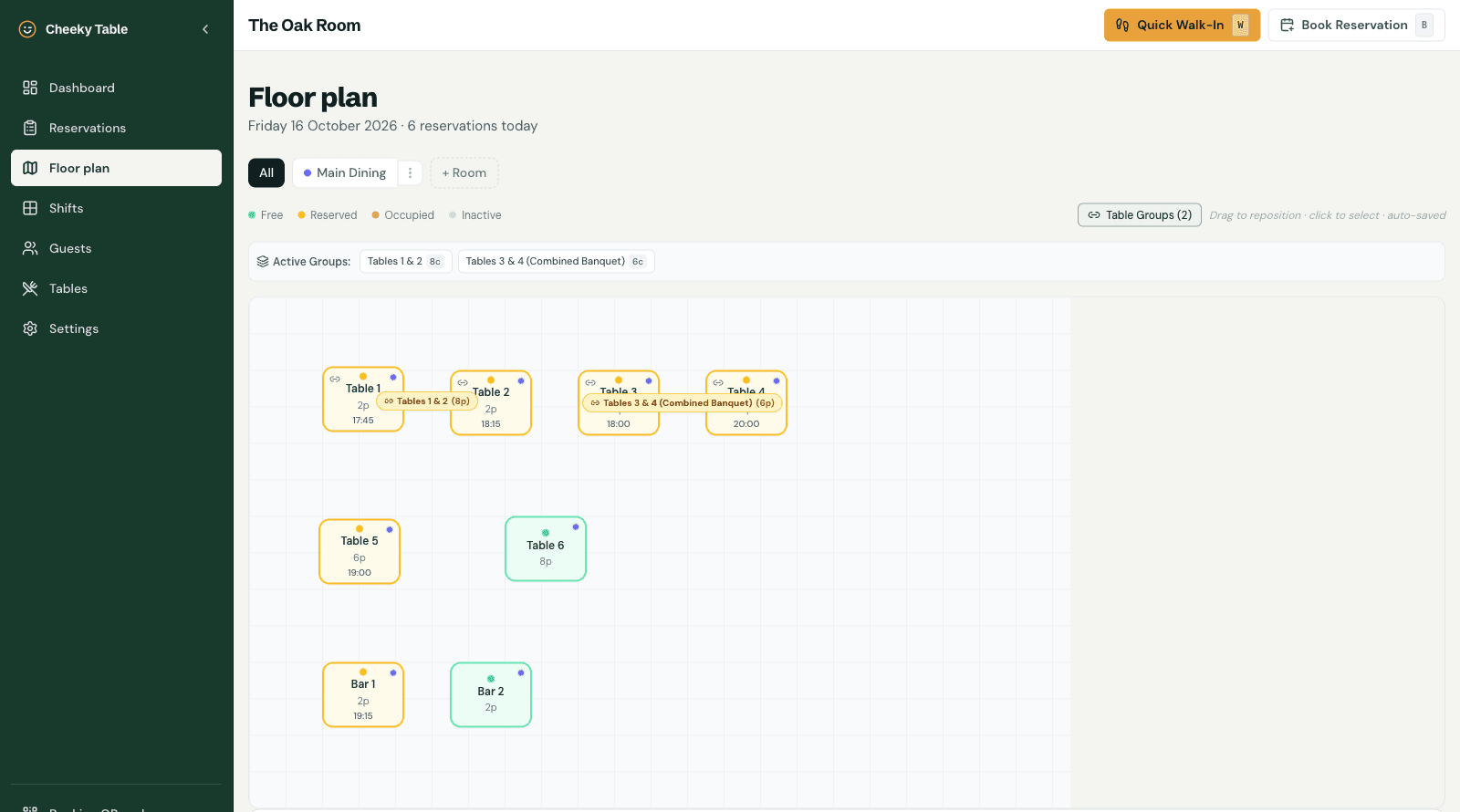
The short answer: since our guest reviews update, your floor plan can look like your actual room, and you can draw it from a photo or sketch in a few seconds. Tables can be round, square, rectangular, booths, high tops or bar counters, with their chairs drawn in. Walls, windows, the entrance, the kitchen, the bar and plants can go round them. Tables now free up the moment you mark a party finished. The dashboard, reservation cards and Settings have all been redesigned to be quicker to read in the middle of a service.
Tables that look like your tables
Open Floor plan, click Edit layout and select a table. You can now choose its shape:
- Rectangle, square, round, booth, high top or bar counter. Chairs are drawn round each one for the number of seats it has, a booth gets its bench, and a bar counter gets stools along one side.
- Any size. Set the width and depth yourself, or click Fit to seats for a sensible size for that number of guests.
- Any angle. Turn tables 15° at a time, or press R. The table name stays upright so you can still read it.
Your existing layout stays exactly as it was until you change it: every table starts as the same rectangle it was before.
Walls, windows, the bar and the plants
In Edit layout, click Add to plan to draw the room around your tables: walls, windows, doors, the bar, the kitchen, the toilets, plants, pillars, and text like "Terrace" or "Entrance". New items appear in a clear space, ready to drag into place.
If you have more than one dining area, each item can belong to one of them, or to every area for things like the front wall.
During service, fixtures are just part of the picture. They can't be clicked or moved by accident.
Tables you've switched off in Tables no longer clutter the floor plan. In Edit layout, Show tables not in use brings them back if you need to move one.
New tables you add in Tables now appear in a clear space on the floor plan, sized for their seats, and change size if you change their seats. Each table on the Tables page links to it on the floor plan, and back again.
Draw it from a photo or sketch
Setting up a floor plan by hand takes a while, so let us do it. In Edit layout, click Draw from a photo and upload a sketch of your room, or a photo of a printed plan like your fire-exit plan. Cheeky Table reads the tables, their shapes and seats, and the walls, windows, bar and entrance, and draws them for you.
- You check it first. You see a draft before anything changes, with each table listed so you can fix its name or seats, or leave it out.
- Your existing tables are matched, so "T4" on your sketch becomes your Table 4. They only move: their names and seats never change, and nothing is deleted.
- Number your tables and draw the chairs on your sketch, and a plan seen from above works far better than a photo taken across the room.
The image is read by Google's Gemini AI and we don't keep it. Please don't photograph guests or staff. More in our privacy policy.
Line things up with snap to grid
Snap to grid is on by default in Edit layout, so tables and fixtures line up as you drag them. Arrow keys move the selected item one grid point at a time, or further with Shift. Turn it off for fine positioning, and Cheeky Table remembers your choice.
Tables free up as soon as a party leaves
When you mark a party finished early, their table is now free straight away. Before, it stayed blocked until the booking was due to end, which could stop you seating a walk-in there or taking a new booking for it.
Seat a walk-in at the table you're looking at
Click any table on the floor plan to see who's there now, who's next, and buttons to seat, finish or seat a walk-in. Seat a walk-in here now opens with that table already chosen and a party size it seats. If the table can't take the party, it tells you why (for example "Table 5 seats 3–6") instead of quietly switching to Auto.
When you add a walk-in or a booking, the confirmation now shows its date and time as well as the table, so you can double-check it before you move on. Thanks to Coco Lounge for the suggestion.
Tables also say their status in words and shapes, not just colour: occupied tables are filled, reserved ones have a dashed outline, and free ones say "Free".
A calmer dashboard
The dashboard now leads with what matters during service: today's bookings and covers, how full you are, and how many guests are on their way, dining now or finished. Below that is today's list, with guest and staff notes on each booking where you can see them.
On Reservations, each card shows the one or two actions that make sense for that booking right now, like Seat now, Mark finished or Confirm booking, with notes underneath. Insights and the menu have been tidied up to match, and dark mode is easier on the eyes.
Settings in tabs
Settings is now split into Bookings, Opening hours, Emails, Venue and Share and refer, so you can go straight to what you need instead of scrolling one long page.
Get paid for recommending us
If you work with venues, our new Partner Programme pays you for every venue you bring to Cheeky Table.
Smaller things
- Friendlier error pages. If a guest follows a broken or mistyped booking link, the page suggests the venue they were probably looking for.
- More accurate guest visit counts, and tighter security on the links in booking emails.
- The printed floor plan uses your table shapes, sizes and angles.
Still on the list
Cheeky Table still doesn't send text messages or take deposits and card holds. Replying to reviews is next, and the floor plan will get your walls and fixtures on the printed copy too. If something would make your service easier, tell us.
Cheeky Table is one flat £9.99 a month with every feature included, and no per-cover fees. Claim 6 months free →