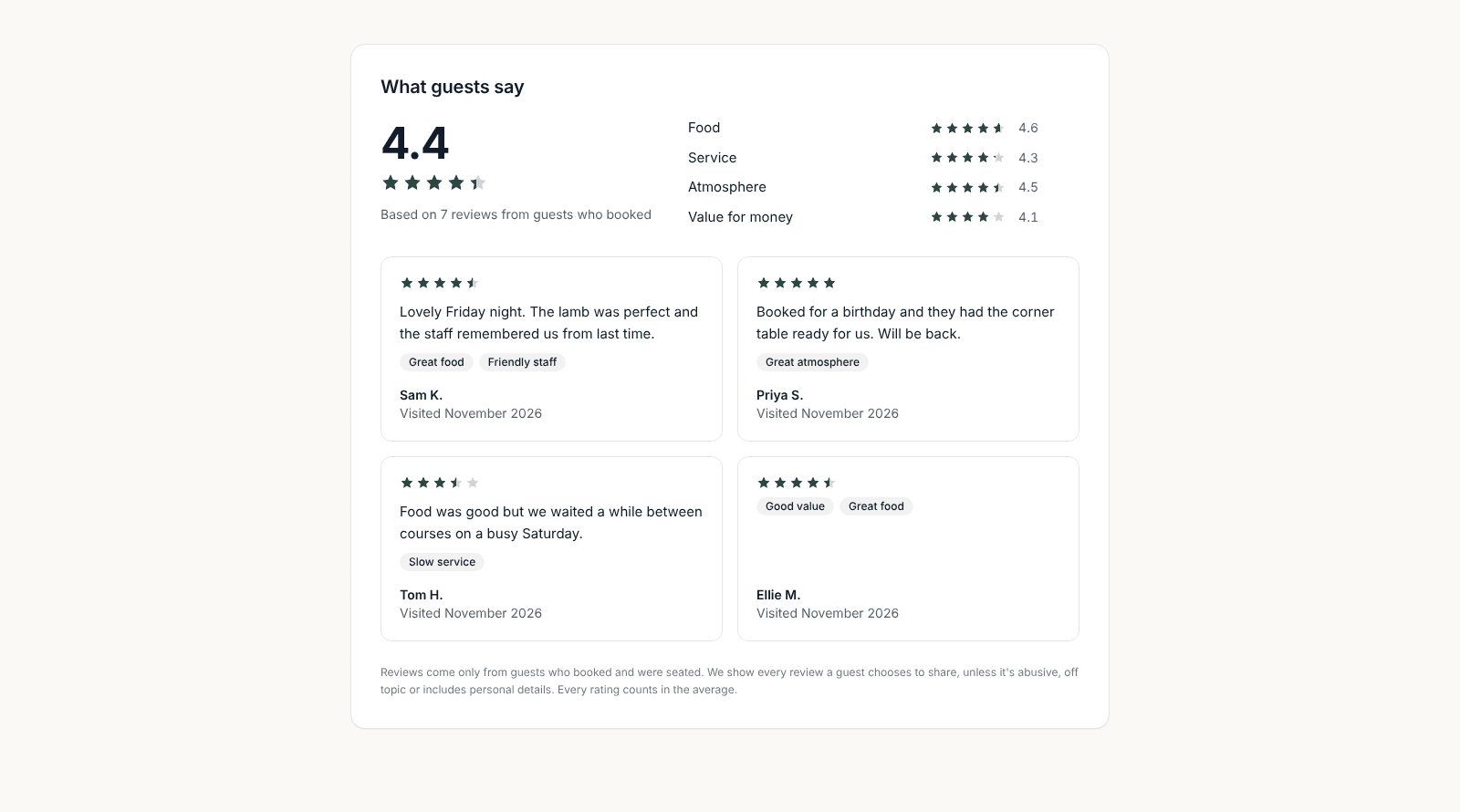
The short answer: since our mid-November update, Cheeky Table can email your guests the morning after their visit and collect star ratings and reviews for you. You can show your rating on your booking page, hear about every booking on your phone (not just today's and tomorrow's), and sign in with Microsoft. And for every venue you refer, you get money off: refer three and Cheeky Table is free.
Once again, most of this started with a request from the Coco Lounge in Mansfield.
A thank-you email the morning after
Turn on Feedback email in Settings, under After the visit, and guests get a short thank-you from your venue the morning after they came in, with a button to tell you how it went.
- Only guests who were there. It goes to guests you marked as seated or completed, never no-shows or cancellations, and once per visit.
- In your colours, with your logo, and your own short message if you want one.
- Guests can stop them. Every email has a "Don't send me these" link.
The button can go to one of two places.
Cheeky Table's review form
Choose Cheeky Table's review form and guests land on a page in your venue's own look, with their name, email and visit date already filled in. There's nothing to type:
- Star ratings in half stars, for the visit overall, then food, service, atmosphere and value for money.
- Quick picks like Great food, Friendly staff or Slow service, and room for a comment if they want to say more.
- A private note just for you, which is never shown publicly.
- Their choice to share. Guests decide whether their review can appear on your booking page, signed with their first name and initial only.
Every review lands on a new Feedback page in the menu, with your average rating, the averages for food, service, atmosphere and value, how the stars spread, and each review linked to the guest and their booking.
Or use your own form
Already have a Google Form, or would rather send guests straight to your Google or Tripadvisor reviews? Choose My own form or review page and paste in the link. You can add a second button too, like "Leave us a Google review" next to your own form.
Your rating on your booking page
Tick Show reviews, and once you have five reviews, your booking page shows your star rating, the four averages and the latest reviews guests chose to share.
We've built it to be fair, because that's what makes reviews worth reading (and it's what UK consumer law expects):
- Every guest gets the same email and the same form, whatever their score. Nobody is steered towards a review site only if they're happy.
- Every rating counts in your average.
- You can only hide a review's text if it's abusive, not about the visit, or includes someone's personal details. Never just for being negative, and its rating still counts.
Hear about every booking
Phone notifications used to cover bookings for today and tomorrow only. In Notifications, under Which dates, you can now choose Any date, and hear about every new booking and cancellation however far ahead. It's each person's own setting, so your team can choose differently.
One more way onto your mailing list
If you collect news and offers sign-ups, guests who didn't tick the box when they booked can now sign up from the Change or cancel page linked in their booking emails. It's recorded just like a sign-up at booking: when, how, and the exact wording.
Sign in with Microsoft
As well as Google, you can now sign up and log in with your Microsoft account, like Outlook, Hotmail or Live, with no password or email link needed.
Refer a venue, get money off
Know another café, pub or restaurant that's paying too much for bookings? In Settings, under Refer a venue, you'll find your own link.
- £3.33 a month off for each venue that signs up with it, once they've paid for two months, for as long as they keep paying.
- Refer three venues and Cheeky Table is free.
- Your link opens a page saying your venue recommends Cheeky Table, and Settings shows who's signed up and this month's credit. How referrals work.
Smaller things
- Easier-to-read Settings. Setting names, tickboxes and help text are bigger, to match the Notifications page.
- Dark mode fix. The Cheeky Table logo on your list of venues now shows up in dark mode.
- Booking links show only what the guest needs. The page guests use to change or cancel now loads just their own booking details.
Still on the list
Cheeky Table still doesn't send text messages or take deposits and card holds. Replying to reviews is next on our list. If something would make your service easier, tell us.
What came next: the floor plan update.
Cheeky Table is one flat £9.99 a month with every feature included, and no per-cover fees. Claim 6 months free →