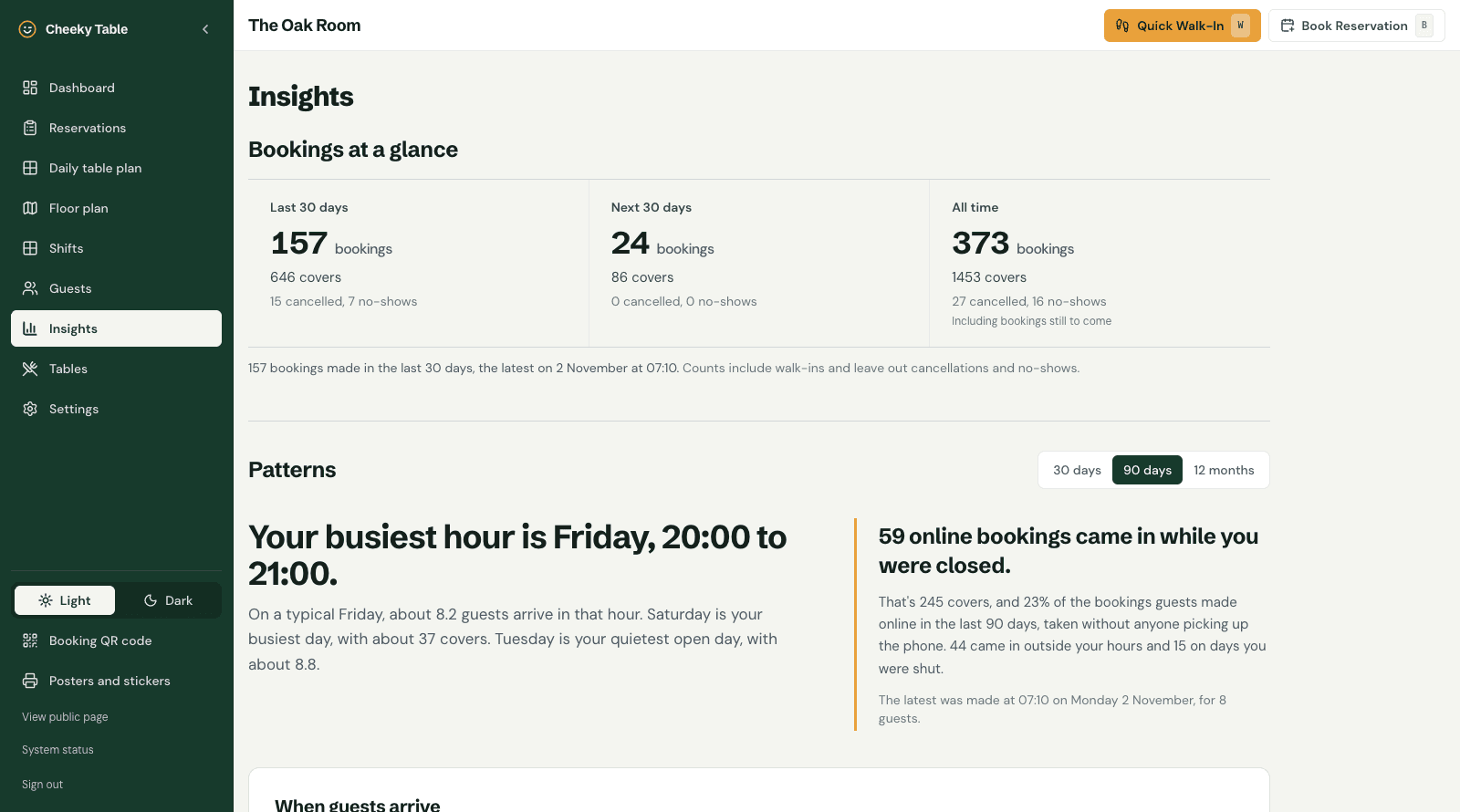
The short answer: since our late October update, you can confirm pending bookings with one click from the notification email, guests are told clearly when a booking is still waiting for you, walk-ins no longer send you emails, and a new Insights page shows your busiest and quietest times. Tables and opening hours have become more flexible too.
Two of these came straight from a venue owner who emailed with requests on a Monday and had both by the end of the week. That's how most of Cheeky Table gets built, so keep the requests coming.
Confirm a booking straight from the email
If you confirm bookings yourself instead of accepting them automatically, the email you get for each new booking now has a Confirm booking button. Tap it, check the details, and confirm. There's no need to sign in or open the dashboard first.
The link only works for that booking, expires after 14 days, and asks you to press confirm on the page it opens, so an email app scanning links can't confirm a booking by accident.
Clearer messages while a booking waits for you
When a venue confirms bookings by hand, guests now see "booking request received" rather than "confirmed", both on screen and in their email. When you confirm it, they get the real confirmation. Reminder emails only go to confirmed bookings.
Fewer emails you don't need
- Walk-ins never send a notification email. You added them yourself, so you already know.
- Phone bookings are your choice. A new setting, Phone booking email, decides whether bookings your team adds by phone send an email to you and your managers.
- No emails for changes during service. Marking a booking as seated, completed or a no-show no longer emails anyone. Guests still hear about real changes, such as a new time or party size, or a cancellation.
Insights: your busiest and quietest times
A new Insights page shows, from your own bookings:
- your busiest day and busiest hour of the week
- your quietest day out of the days you're open
- covers for the last 30 days, the next 30 days and all time
- how many online bookings arrived while you were closed: the bookings you'd have missed with a phone-only diary
Use it to plan rotas, ordering and quiet-day promotions. Find it in the sidebar of your dashboard.
More flexible tables
A new setting, Smaller parties on bigger tables, lets staff seat a party below a table's minimum, after confirming. It's useful on a quiet night when the four-seater is free and a couple walks in. Online bookings still follow each table's minimum.
Opening hours that look after themselves
- If you've scheduled new opening hours, for example winter hours from a set date, they become your regular hours automatically when they start.
- Your venue's page on Cheeky Table now shows the hours that apply this week, including any closed days and special hours.
Faster and steadier
- A faster booking calendar. The calendar on your booking page now loads a whole month's availability at once, so moving between dates is quicker for guests.
- A public status page. If you ever think something's wrong, the System status link in your dashboard and at the foot of our website shows whether Cheeky Table is running normally.
- Under the hood: we've tightened security, added automated tests that run before every release, and moved to the latest versions of the frameworks Cheeky Table is built on.
Our website in 10 languages
The Cheeky Table website is now available in the same 10 languages as venue booking pages: English, French, German, Spanish, Portuguese, Arabic, Hindi, Japanese, Korean and Chinese.
Still on the list
Cheeky Table still doesn't send text messages or take deposits and card holds. Both remain on our list.
Cheeky Table is one flat £9.99 a month with every feature included, and no per-cover fees. Claim 6 months free →